n8n, Zapier and Make can all automate business workflows, but they are not interchangeable. Zapier is usually the fastest choice for simple SaaS automations, Make is strongest for visual multi-step workflows, and n8n is best when AI workflows need control, branching, self-hosting or complex execution logic.
AI Summary
Quick Answer
Choose Zapier if you want the easiest automation tool for simple app-to-app workflows. Choose Make if you need a visual workflow builder for multi-step scenarios. Choose n8n if you are building complex AI workflows where logic, control, self-hosting and execution-based scaling matter more than beginner simplicity.
- Best for simple automation: Zapier is usually the safest option for non-technical teams that want fast setup and broad app connectivity.
- Best for visual workflows: Make is the strongest middle ground when you need branching, data transformation and visual control without writing much code.
- Best for AI workflows: n8n is strongest when workflows involve AI calls, webhooks, databases, custom logic, retries and ownership of the automation stack.
- Best pricing lens: Do not compare only monthly plan prices. Compare how each platform charges or limits workflow complexity.
- Keyword scope: This n8n vs Zapier vs Make guide also covers common comparison variants such as n8n vs Make vs Zapier, Zapier vs Make vs n8n, Make.com vs n8n and n8n vs Make.com.
Quick Verdict: Which Tool Should You Choose?
If you only remember one rule from this n8n vs Zapier vs Make comparison, use workflow shape as the decision filter. A simple trigger-action workflow, a visual multi-branch workflow and a complex AI workflow have very different requirements.
| Workflow need | Best choice |
|---|---|
| Fast SaaS automation | Zapier. Best when a non-technical team wants to connect common apps quickly with minimal setup. |
| Visual multi-step workflow | Make. Best when the workflow needs branching, filters, routers and visual debugging. |
| Complex AI workflow | n8n. Best when the workflow includes AI calls, custom logic, webhooks, databases, retries or self-hosting. |
| Marketing or sales ops | Zapier or Make. Zapier wins for speed; Make wins when the workflow becomes more visual and conditional. |
| Technical AI operations | n8n. Best fit when the team wants more control over execution, infrastructure and workflow logic. |
The AI Workflow Complexity Tax
The biggest mistake in comparing n8n vs Zapier vs Make is treating automation cost as a simple monthly subscription question. For AI workflows, the real cost driver is workflow complexity: how many steps run, how often they run, how many branches exist, how much data is transformed, and how many AI calls, retries and approvals the workflow needs.
LeWeb decision rule
The cheapest automation platform for AI workflows is not always the one with the lowest monthly plan. It is the platform whose pricing and operating model best fits the shape of your workflow: simple task chains, visual multi-branch operations or complex execution-heavy automations.
This is the AI Workflow Complexity Tax. Simple workflows are judged by ease of use. Complex AI workflows should be judged by complexity tolerance: how well the platform handles branching, error recovery, custom code, data transformation, observability and long-term maintainability.
| Workflow shape | Practical implication |
|---|---|
| Simple chain | Typical winner: Zapier. Example: new form submission → CRM → Slack notification. The workflow is easy to explain and usually does not need heavy branching. |
| Visual operations | Typical winner: Make. Example: lead enrichment → filters → multiple CRM updates → team notifications. The visual canvas helps teams understand branching and data flow. |
| AI orchestration | Typical winner: n8n. Example: webhook → AI classifier → database lookup → conditional routing → retry logic → internal tool update. Control and execution logic matter more than beginner simplicity. |
n8n vs Zapier vs Make: Main Comparison
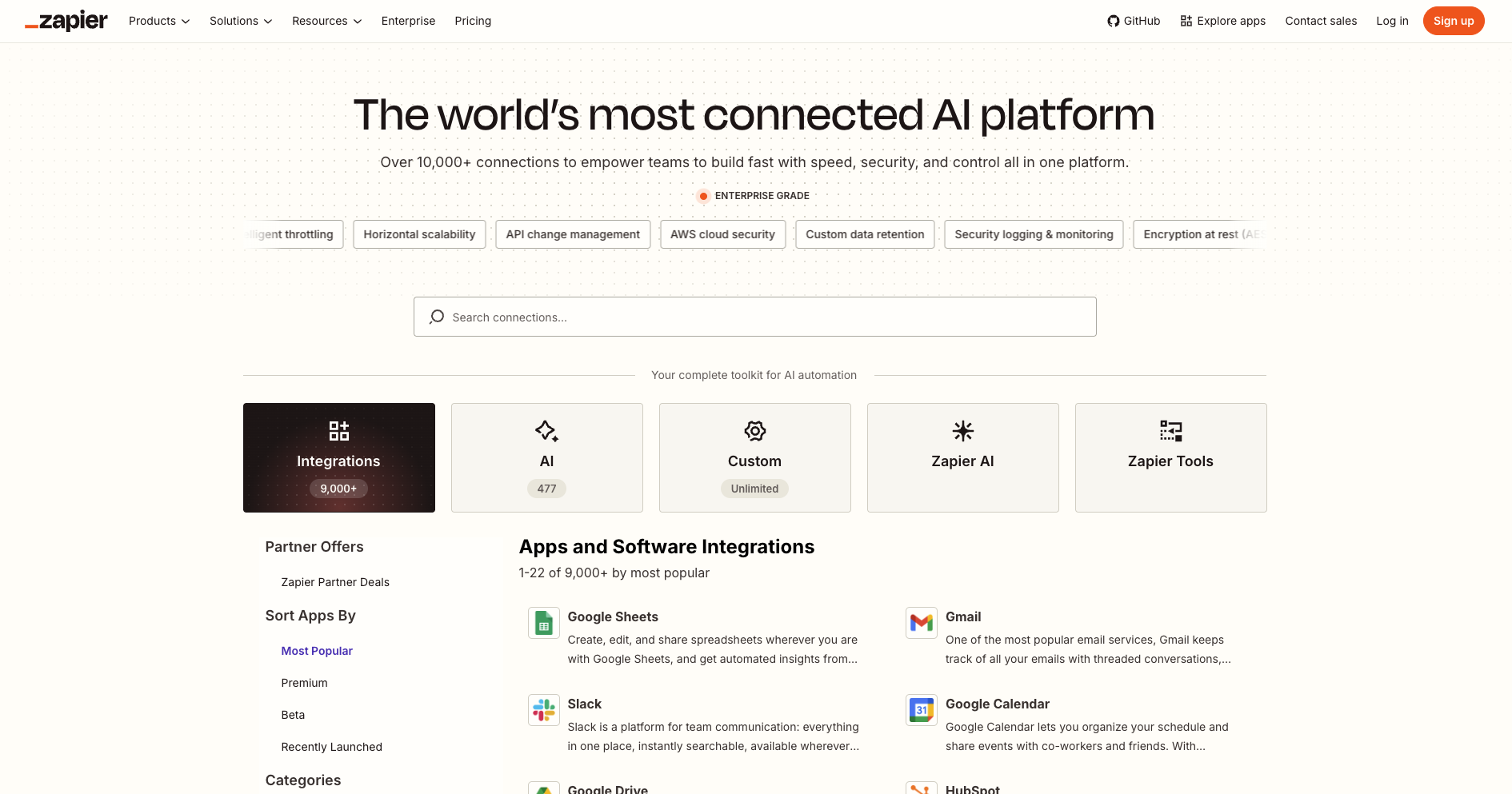
Zapier, Make and n8n overlap, but each platform is optimized for a different type of buyer. Zapier prioritizes accessibility, Make prioritizes visual workflow design, and n8n prioritizes flexibility and technical control.
| Criterion | Best platform |
|---|---|
| Ease of use | Zapier. Best for teams that want fast setup and simple app-to-app automation. |
| Visual design | Make. Best for teams that want to see the flow of data, conditions and branches on a visual canvas. |
| Complex logic | n8n. Best for technical teams that need custom logic, APIs, webhooks and advanced workflow control. |
| AI workflow control | n8n. Best when AI steps need validation, fallback logic, data storage, custom routing or self-hosted infrastructure. |
| Fastest setup | Zapier. Best for quick wins and non-technical automation builders. |
| Middle ground | Make. Best when Zapier feels too simple but n8n feels too technical. |
| Self-hosting | n8n. Zapier and Make are cloud-first platforms; n8n is the natural choice when infrastructure control matters. |
Pricing Comparison: Tasks, Credits and Executions
For simple automations, pricing can look straightforward. For AI-heavy automations, pricing becomes a workflow-design question. The same business outcome can require a few steps in one platform and many tasks, credits or executions in another.
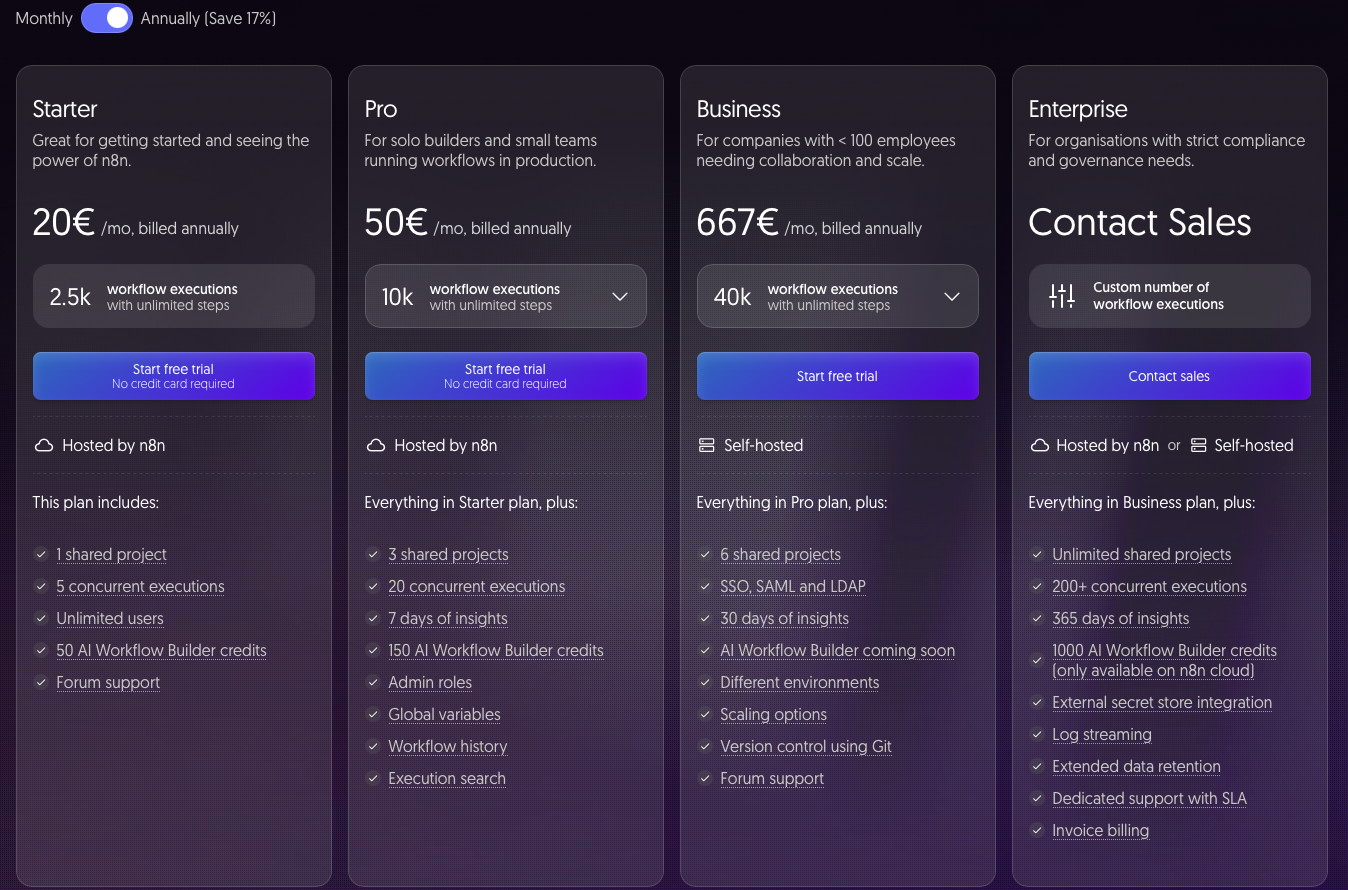
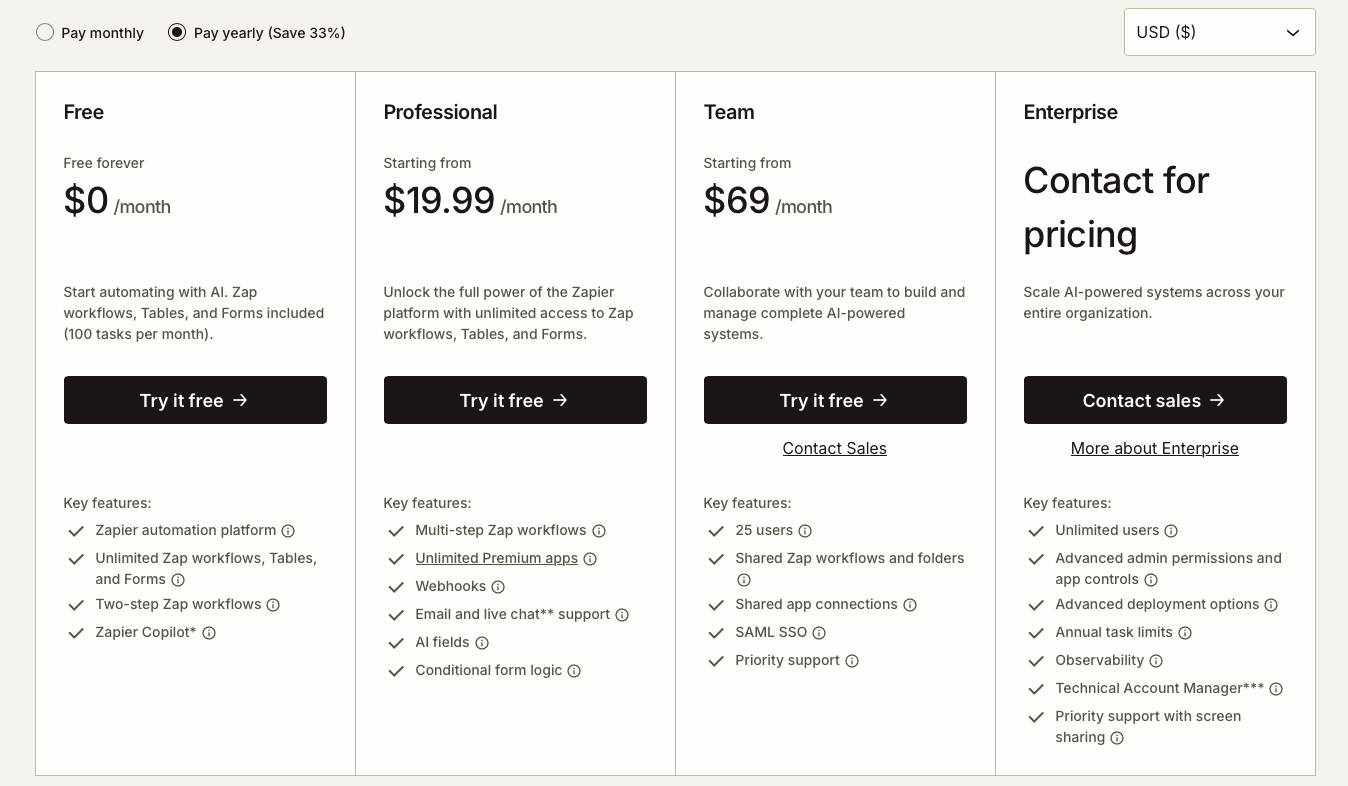
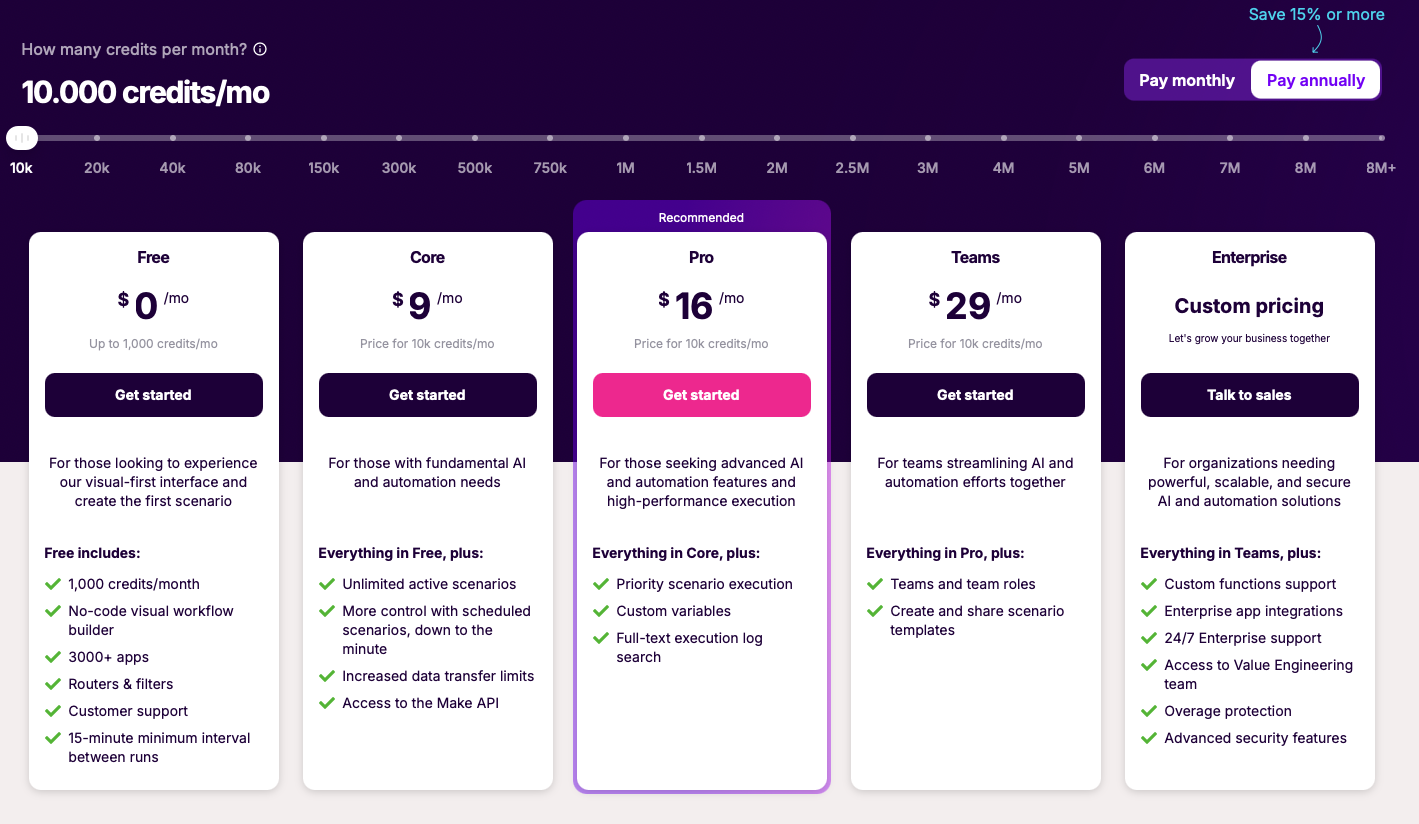
n8n’s official pricing page frames plans around workflow executions with unlimited steps. Zapier’s pricing page highlights plan tiers for AI-powered workflows and monthly task limits. Make’s pricing screenshot shows a credit-based model with plan tiers for visual-first automation. This is why n8n vs Zapier pricing, n8n vs Make pricing and Make vs Zapier pricing should be compared by workflow shape rather than plan price alone.
| Pricing lens | What it means for buyers |
|---|---|
| Zapier | Think in tasks. Zapier is attractive when workflows are simple and predictable. If an AI workflow creates many actions, checks or updates, model the task volume before choosing a plan. |
| Make | Think in credits and visual scenarios. Make is useful when the workflow needs more visual logic than Zapier, especially for branching and data transformation. |
| n8n | Think in executions and control. n8n becomes attractive when workflow complexity grows and the team wants more ownership over logic, infrastructure and execution design. |
Pricing pages are not enough
Before choosing a platform, map one real workflow with estimated monthly runs, steps, branches, AI calls and failure handling. The best platform is the one that stays affordable and maintainable at your real workflow shape, not at a demo workflow shape.
n8n vs Zapier
The n8n vs Zapier decision is mostly a tradeoff between simplicity and control. For teams searching Zapier vs n8n, the short answer is simple: Zapier wins on speed, while n8n wins on control.
Choose Zapier if your automation is easy to explain in one sentence: “when this happens, do that.” It is especially strong for marketing, sales, support and operations teams that want to automate common SaaS tasks without involving engineering.
Choose n8n if the workflow is closer to a system than a simple automation. If you need to route AI outputs, validate structured responses, call internal APIs, store intermediate data, retry failed steps or keep control over infrastructure, n8n is usually the stronger long-term fit. This is the practical center of the n8n vs Zapier comparison.
| Decision | Recommendation |
|---|---|
| Use Zapier | When speed, simplicity and non-technical maintenance matter more than deep workflow control. |
| Use n8n | When AI workflow logic, self-hosting, custom code, APIs and execution control matter more than beginner simplicity. |
n8n vs Make.com: Visual Builder vs Technical Control
The n8n vs Make comparison is more nuanced because both tools can handle multi-step workflows. For the high-volume Make.com vs n8n and n8n vs Make.com comparison, the practical question is visual ease versus technical control.
Choose Make if you want a visual workflow builder for operations teams. Its canvas-style approach makes branching, filters and data flow easier to inspect than a purely linear automation builder. For many teams comparing Make vs n8n, Make is the best middle ground between Zapier’s simplicity and n8n’s technical depth.
Choose n8n if your team needs more control over workflow logic, self-hosting, custom integrations or AI orchestration. In AI workflows, this can matter when outputs need validation, fallbacks, database writes, internal API calls or compliance-sensitive infrastructure choices.
| Decision | Recommendation |
|---|---|
| Use Make | When the team wants a visual, flexible workflow builder without moving fully into a technical automation stack. |
| Use n8n | When control, self-hosting, custom APIs and AI workflow orchestration are more important than visual ease. |
Make vs Zapier
The Make vs Zapier and Zapier vs Make decision is usually about simplicity versus visual flexibility. Zapier is often better for a small team that wants to automate standard business tasks quickly. Make is often better when the workflow needs branching, visual inspection, more advanced transformations or a clearer view of how data moves between steps.
Choose Zapier if the team values speed and ease above everything else. It is a strong default for common SaaS workflows like forms to CRM, calendar to Slack, lead capture to email marketing, or simple support notifications.
Choose Make if Zapier starts to feel too linear. When a workflow has multiple paths, filters, routers or data transformations, Make’s visual model can become easier to manage than a long chain of simple automation steps. For a Make.com vs Zapier comparison, the deciding factor is usually whether the team needs faster setup or more visual workflow control.
| Decision | Recommendation |
|---|---|
| Use Zapier | When the workflow is simple, the team is non-technical and speed matters most. |
| Use Make | When the workflow needs visual branching, scenario design and more flexible operations logic. |
Best Platform for AI Workflows and AI Agents
For AI workflows, the comparison changes. The question is no longer only “which tool connects the most apps?” The better question is: “which tool lets us run reliable AI workflows without losing control over cost, data, logic and maintenance?”
A simple AI workflow might summarize a form submission and send it to Slack. Zapier or Make can be a good fit. A more serious AI workflow might classify leads, enrich CRM records, call an internal API, check a database, route outputs by confidence score, create a draft response and retry failed steps. That is where n8n becomes more compelling.
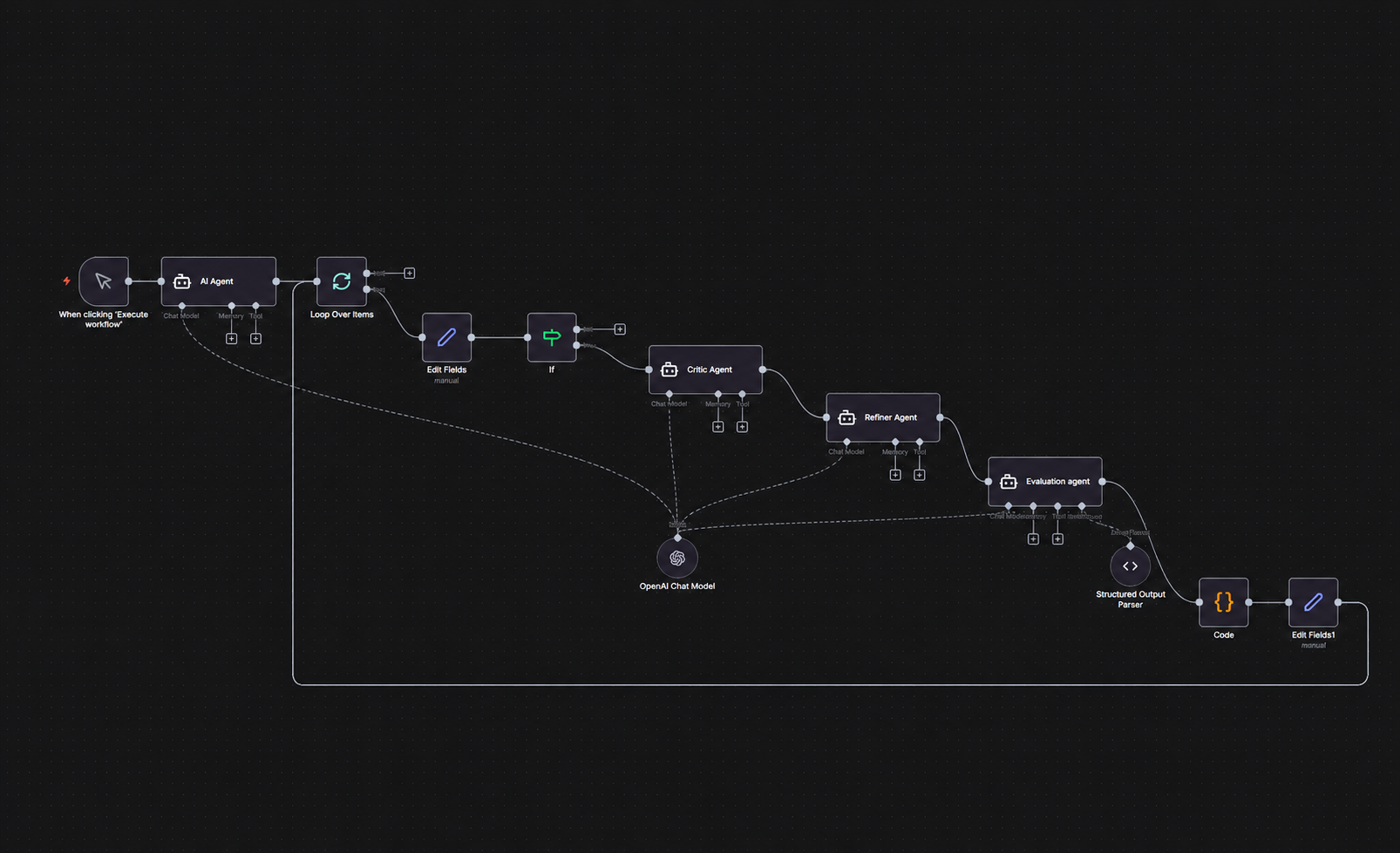
For n8n vs Make AI workflows, n8n usually has the advantage when the workflow needs custom logic, databases, API calls or self-hosting. Make can still be better when the workflow must remain understandable to a business operations team that prefers visual editing.
| AI workflow type | Best fit |
|---|---|
| AI summary | Zapier or Make. Good for simple AI steps such as summarizing form submissions, tickets or emails. |
| AI enrichment | Make or n8n. Better when data must be cleaned, transformed and routed across multiple tools. |
| AI orchestration | n8n. Best when the workflow needs webhooks, custom code, databases, retries, approvals and internal APIs. |
| AI agents | Make or n8n. Make is strong for visual team workflows; n8n is stronger when agent logic needs technical control. |
Final Decision Framework
The best choice depends less on the brand and more on the workflow your team will maintain six months from now.
Choose Zapier if
You want the fastest path from idea to automation, your team is mostly non-technical, and the workflow connects common SaaS apps in a simple sequence.
Choose Make if
You want a visual automation builder for multi-step business workflows, especially when the workflow needs branching, filters, routers or data transformation.
Choose n8n if
You are building complex AI workflows, internal automations, self-hosted systems or API-heavy processes where workflow control matters more than beginner simplicity.
For most AI-native businesses, the practical answer is not one tool forever. Zapier can be the quickest operational layer, Make can be the visual workflow layer, and n8n can be the technical AI orchestration layer. But if you must choose one platform for serious AI workflows, n8n has the strongest long-term control advantage.
FAQ
Is n8n better than Zapier?
n8n is better than Zapier for complex, technical or AI-heavy workflows that need custom logic, self-hosting, APIs or execution control. Zapier is better for simple automations that non-technical teams want to launch quickly.
Is Make better than Zapier?
Make is better than Zapier when workflows need visual branching, routers, filters and more advanced data transformation. Zapier is better when the priority is speed, simplicity and common SaaS app automation.
Is n8n better than Make?
n8n is better than Make when technical control, self-hosting and AI workflow orchestration matter most. Make is better when the team wants a visual builder that is easier for business users to inspect and maintain.
Which is cheaper: n8n, Zapier or Make?
There is no universal cheapest option. Zapier should be evaluated by task volume, Make by credits and scenario complexity, and n8n by executions, hosting model and maintenance cost. For AI workflows, compare the total workflow shape rather than only monthly plan prices.
Which platform is best for AI workflows?
n8n is usually the best platform for complex AI workflows because it gives teams more control over logic, APIs, self-hosting and execution design. Zapier and Make can still be better for simpler AI automations or business-user workflows.
Can n8n replace Zapier?
n8n can replace Zapier for teams that are comfortable with a more technical automation platform. For non-technical teams that mainly need quick SaaS connections, Zapier may remain easier to use and maintain.
Can Make replace Zapier?
Make can replace Zapier when a team needs more visual workflow control and branching. Zapier is still often easier for simple trigger-action automations and teams that want the lowest learning curve.
What is the best automation tool for small businesses?
Zapier is usually best for small businesses that want easy automations quickly. Make is better for small businesses with more complex workflows. n8n is best when the small business has technical resources or needs AI workflow control.
Sources and Further Reading
- n8n Pricing
- Zapier Plans and Pricing
- Make Pricing and Subscription Packages
- n8n AI Agents
- Make AI Agents
- Zapier App Directory
Research date: June 27, 2026. Pricing and AI platform features change frequently; verify official pricing pages before making a final purchasing decision.